


Melody Beat - Offline Music
4.0110.00 Reviews
App Specs
- Version
- 1.2.4
- Updated On
- License
- Free
- Downloads
- 10,000,000+
- Developer
- Flores
- Categories
- Music & Audio
- Platform
- Android
Screenshots
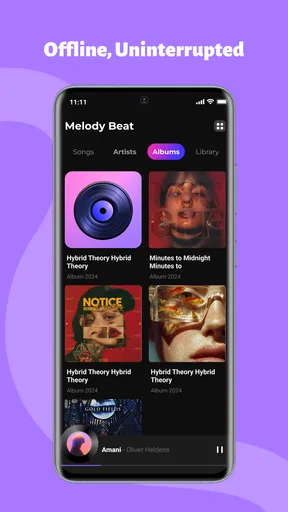
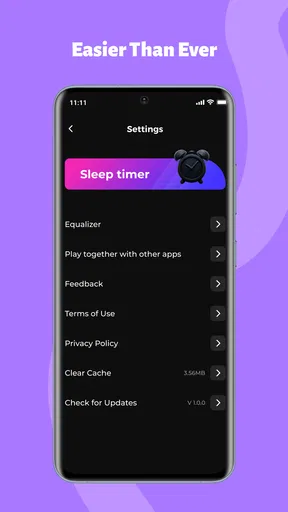
 Analysis by AppCompare
I pay close attention to whether a music app stays easy to use when I’m tired, in a hurry, or listening somewhere with poor reception. Melody Beat - Offline Music is aimed at people who want their own tunes available away from a reliable connection, and that makes it worth considering for commutes, exercise, and travel. I find the idea most useful when I can prepare what I want to hear before leaving home, rather than relying on a connection to work at the exact moment I need music.
Readable controls matter more than flashy menus
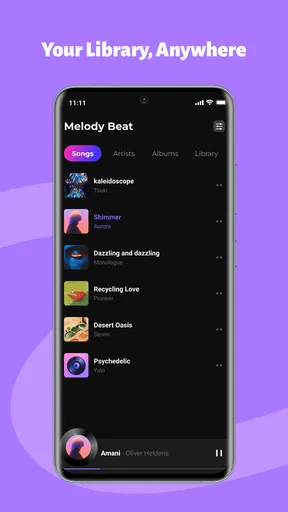
Music is often something I control while doing something else, so I value an interface that does not make basic listening feel like a task. The published review of this app describes its menus as straightforward, with access to tracks that feels direct rather than buried. That kind of simplicity can help someone who prefers fewer navigation steps, although it is not the same as a confirmed accessibility feature. I would still take a moment to check whether the text and controls are comfortable on your own device before relying on it for regular use.
There is a practical distinction between a clean-looking screen and an easy-to-use one. A listener may need larger text, stronger contrast, screen-reader support, or more time to make a selection; a tidy layout alone does not guarantee those needs are met. If you have a particular visual or cognitive requirement, I suggest testing the actions you use most—finding a song, starting playback, and returning to a playlist—before building your routine around the app.
Listening around movement and sensory needs
Offline playback is useful not only for avoiding a weak signal but also for reducing interruptions. If you are walking through a station, working out, or trying to settle down at night, fewer connection-related pauses can make listening feel calmer. The app is presented as suitable for music during workouts and travel, but people differ in how much sensory input they enjoy. A busy screen, bright colors, or frequent interaction can be distracting for some listeners, so I would set up a small, familiar selection before starting an activity instead of browsing while moving.
Sound preferences are personal, too. The original review mentions equalizer controls and the ability to adjust the sound, which may be appealing if you like shaping bass or treble. That should not be confused with a hearing aid function or a substitute for individualized hearing support. I would treat sound adjustments as a way to tune ordinary listening, and keep the volume comfortable rather than trying to compensate for noisy surroundings by turning it up.
When offline listening fits the day
A useful routine is to choose music while you have time and a stable connection, then check that your intended listening is ready before heading out. This matters on a train, during a flight, or on a route where mobile service comes and goes: discovering a missing track after you have lost reception is much less convenient than checking in advance. For a workout, I would make a short playlist before leaving, so I can spend less time looking at the phone and more time moving safely.
Offline listening also has a trade-off: it depends on having the music available on the device, and preparing a large collection takes attention and storage. If you mainly want to explore unfamiliar artists or constantly change what you hear, an online streaming service may suit you better. If you already know what you like and want it ready without depending on a live connection, an offline-focused player can be a more comfortable fit.
Worth Reading Before You Choose

EA SPORTS FC Mobile 26 Is a Bigger Football Game, but It Takes Time

Flipboard Shows What News Apps Must Do Beyond the Feed

Switching to Android Auto Means Rethinking Your Driving Routine

Google Calendar Makes a Crowded Week Easier to Manage

Ludo King Makes the Most of the Minutes Between Plans

Baby Panda World Brings Quick Play to Modern Phones, but Its Game Library Feels Busy
Why Melody Beat Stands Out
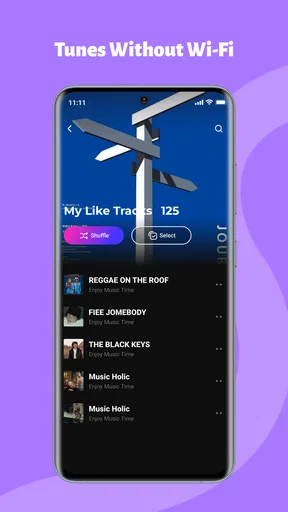
So, what makes Melody Beat - Offline Music a must-have? First off, the app is incredibly user-friendly. From the moment I downloaded it, I was impressed by how intuitive the interface is. No complicated menus or hidden buttons—just straight-up access to all your favorite tracks. And the best part? You can download them for offline listening! Yep, no more worrying about buffering or losing your tunes when you step into an elevator.
A Seamless Experience
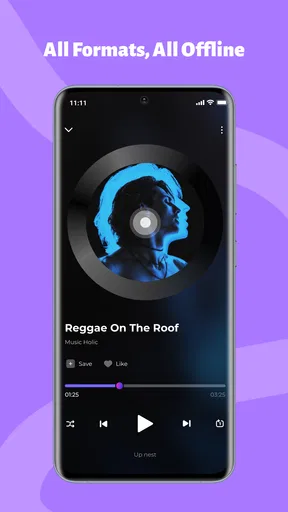
Another thing I love about this app is its seamless playback. Whether I’m in airplane mode or deep in the mountains, my playlists never miss a beat. Just imagine being able to tune out the world and dive into a music sanctuary where everything is just the way you like it. Melody Beat makes it happen effortlessly.
Features That Make a Difference
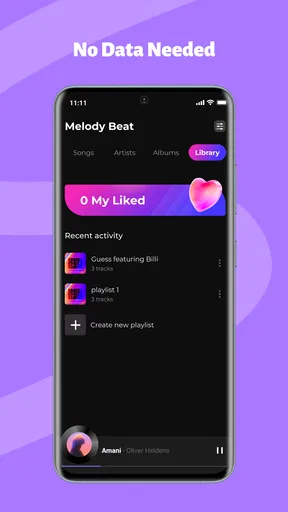
Let’s dive into some of the features. The app offers a wide array of genres and an extensive library. I was pleasantly surprised to find even some of my obscure favorites available for download. Plus, the playlist creation feature is a breeze. I could quickly drag and drop tracks to set up my perfect workout mix or chill-out playlist. And for someone with a busy lifestyle, the sleep timer feature is a godsend. I set it, fall asleep to some soothing tunes, and the app quietly shuts down without draining my battery.
Sound Quality Matters
Now, I’m no audiophile, but I do appreciate good sound quality. I was genuinely impressed by the clarity and depth of the audio in Melody Beat. It’s like having a mini concert in your pocket. The equalizer settings are also top-notch, allowing you to tweak the sound to your liking. Whether you’re into thumping bass or crystal-clear treble, this app has got you covered.
Personal Touches
What really sets this app apart are the little personal touches. The app allows customization of themes, which is a nice touch. I often switch up the look to match my mood—who knew changing colors could be so satisfying? It’s these thoughtful features that make me feel like the developers really get what music lovers need.
Who I’d recommend it to—and who may prefer another player
For me, the strongest case is a listener with a fairly settled music routine: a few familiar albums for the commute, a workout mix, and something soothing at bedtime. The sleep timer and playlists described above make those separate moments easier to organize. Someone who mostly wants radio-style discovery, social sharing, or a constantly refreshed catalogue may be happier with a streaming service built around those habits instead.
A small preparation habit helps avoid the most common offline frustration. Before a trip or workout, I would open the tracks I intend to hear while connected, make sure they are ready, and start playback once before putting the phone away. That quick check is more dependable than assuming a playlist is available just because it appears in the library. It also lets me catch an unwanted shuffle or an out-of-place track before I am on the move.
Everyday access has limits
In a realistic travel day, I might choose a familiar playlist at home, listen during the journey, and switch to a quieter selection at night with the timer. That is a sensible use of offline music because the listening plan is predictable. The trade-off is that changes made on the fly can take more effort than tapping into an online catalogue, and a collection kept on one device needs a little care. If you change phones often or depend on effortless access across several devices, compare that workflow with the services you already use before committing to it.
The app is a free music-and-audio option from Flores. It has an average rating of 4.2 from around two thousand ratings, with more than a million installs, and it is marked for everyone. It was released on August 22, 2025; version 1.0.9 is listed for devices running Android 8.0 or later. Those details make it easy to judge basic fit, but the more important question is whether its way of organizing and preparing music matches your routine.
My inclusive verdict is that the concept is appealing when offline access and familiar playlists matter more than constant discovery. I would recommend trying the core tasks on your own phone—especially locating music, starting a playlist, and adjusting the sound—because accessibility depends on how those controls work for you, not just on a clean interface. If those steps feel comfortable, this can be a practical companion for travel and exercise; if you need specific assistive controls or a broader discovery experience, another player may be the better choice.
In conclusion, if you’re someone who craves a reliable and feature-rich music app, Melody Beat - Offline Music is definitely worth a download. It’s like having your own personal DJ that works just as hard offline as it does online. So go ahead, give it a spin, and let me know how it transforms your music experience!
Pros
- Offline access to all your favorite tracks.
- User-friendly interface with easy navigation.
- High-quality sound without data usage.
- Customizable playlists for personalized experience.
- No ads interrupting your music flow.
Cons
- Limited music library compared to online apps.
- No option to download new songs directly.
- Requires storage space for offline files.
- Lacks advanced equalizer settings.
- No social sharing features available.
FAQs for Melody Beat - Offline Music
What is Melody Beat - Offline Music?
Melody Beat - Offline Music is an app designed for music enthusiasts who want to enjoy their favorite tracks without an internet connection. It allows users to download songs directly to their device for offline playback, featuring a user-friendly interface and various customization options for playlists and audio settings.
How does offline playback work in Melody Beat?
Offline playback in Melody Beat allows users to download music directly onto their device, enabling them to listen without an internet connection. Simply select the tracks you want to save, download them through the app, and enjoy your music anytime, anywhere—perfect for travel or areas with limited connectivity.
Is Melody Beat - Offline Music free to use?
Melody Beat offers a free version with basic features, but to unlock premium functionalities like high-quality audio downloads and ad-free listening, users may need to subscribe to a paid plan. The free version is a great way to explore the app before deciding on a subscription.
What audio formats does Melody Beat support?
Melody Beat supports a variety of popular audio formats, including MP3, AAC, and FLAC. This ensures that users can enjoy their music in high quality, regardless of the original format. The app also offers options for converting tracks to compatible formats if necessary.
Can I create and manage playlists in Melody Beat?
Yes, Melody Beat provides robust playlist management features. Users can create custom playlists, organize tracks by mood or genre, and easily rearrange songs. The interface is intuitive, allowing for seamless editing and sorting to ensure your playlists are just how you like them.


